How Addicted to Photography are You? Let iPhoto Tell You
Posted Monday, August 28, 2006
I'm taking a lot of photos lately. Since falling passionately in love with a Nikon D200 digital SLR back in March, I've taken 4,375 photos. In May, I took 1018 of them. On July 17, I took 122.
How do I know? iPhoto told me so. There are several ways to do very precise photo counts in iPhoto. Conducting a census of your imagery might not be the most fun you can have while sitting at your Mac, but it can be interesting.
Here's how to do it.
The Calendar Pane
The key to photo counts in iPhoto is the Calendar pane, which you can display by clicking the small calendar button in the lower-left corner of the iPhoto window.
The Calendar pane can display an entire year or a specific month. 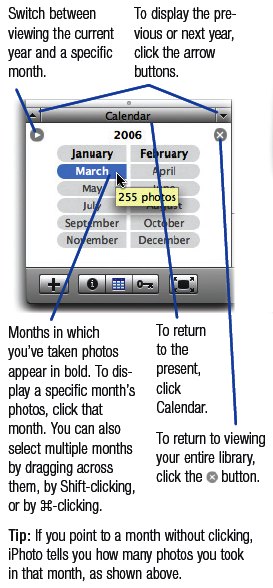
As this excerpt from my book shows, you can get a photo count for a specific month by simply pointing to that month. (Just point; don't click.) Similarly, if you're viewing a specific month's calendar, you can get a photo count for a given day by pointing to the day.
But there's more. To get a photo count from more than one month, simply drag across the months to select them. As you do, iPhoto displays the number of photos at the bottom of its window. Similarly, to get a photo count from more than one day, drag across a range of days in the Calendar pane.
Want More Calendar Pane Details?
You'll find lots of details about the Calendar pane and other iPhoto browsing techniques in the world's top-selling iLife book, which is still going for just $23.09 on Amazon—34 percent off the cover price. Order now.
Want details right now? Download an excerpt from the iPhoto chapter (300K PDF).
Update on the Redesign
The redesign of this site is coming along. Since updating the look of the home page last week, I've since incorporated the new look into the iTunes and iPhoto pages. I've also revamped those pages to make them more useful: in the leftmost column of each page, you'll find links to the latest iTunes and iPhoto updates as well as constantly updated news on digital music and digital photography. You'll also find a shameless e-commerce column that lets you order goodies from Amazon and, in the process, help put a couple of dog biscuits in Sophie's maw.
I'll be gradually applying the new look to the remaining product pages in the days and weeks to come. And I still have to edit most of my archived postings so that they format correctly (specifically, so that the headings operate as permalinks).
Oh, and all those photos I've been shooting? You'll find my favorites on Flickr—my other serious addiction.
Labels: iphoto, photography
Notice Anything Different?
Posted Wednesday, August 23, 2006
Yes, it's a brand-new look for macilife.com! As I mentioned in a previous post, I recently commissioned Seattle-based Textura Design to redesign this site, which had grown creaky and funky over the years.
They've done their work, and magnificently. The new design not only allows for specific pages for iWeb and GarageBand, but it loads much faster and will be easier for me to maintain.
And its underlying HTML code is a thing of utter beauty. It may not mean much to you if you aren't involved in the Web design scene, but the old code behind these pages was outmoded and archaic. The new code, largely the work of Matthew Foster, is modern, elegant, and clean—crafted and presented like a dinner at fine restaurant.
Now it's my turn: In the days (weeks?) to come, I'll be adapting the site to incorporate the new look throughout. I'll add those long-awaited GarageBand and iWeb pages, and update the pages for iTunes, iPhoto, iMovie HD, and iDVD, too.
More podcasts are in the works, too.
In the meantime, the usual "pardon our dust" disclaimer applies. As I pound my hammer, you may encounter broken links, formatting weirdness, and missing content. (At the moment, for example, the archives aren't available.)
And let me know what you think of the new look.
Today Only: Free Copy of Picture Framer Deluxe
Posted Monday, August 21, 2006
I've already sung the praises of Photojojo, a cool email newsletter devoted to digital photography.
Today's issue brings a five dollar bill, sort of. You can get a free copy of Monkey Business Labs' Picture Framer Deluxe, a normally $5 (US) Dashboard widget that displays photos in a variety of frame designs.
I've got my copy set up to display photos from—where else?—Flickr.
Go grab yours. And subscribe to Photojojo while you're at it.
Choices, Choices
Posted Wednesday, August 16, 2006
I was ripping an audio CD yesterday and iTunes displayed the dialog box you see here.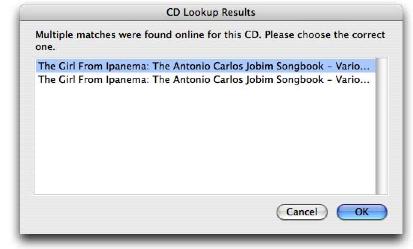
Hmmm. Which one do I want? There's no way to tell the difference—this particular iTunes dialog box lacks a horizontal scroll bar or size control that would allow me to see how the two entries differ.
I can't remember which one I chose, but I did get the correct track names.
Labels: itunes
The Top 20 Audio Plug-ins
Posted Tuesday, August 08, 2006
O'Reilly Media published a nice round-up of audio plug-ins last week. Many of these are overkill for GarageBand users (if they run in GarageBand at all), but the article is still an interesting look at the versatile universe of audio add-ons.
Labels: audio music garageband audiounits
New Podcast! Grab "The Digital Hub," Episode Two
Posted Sunday, August 06, 2006
Seven months in the making—no, not really—episode two of my podcast is now available for your insomnia-curing pleasure.
Labels: podcast



