My Dad Santa
Posted Friday, December 23, 2005
Happy Holidays from Me and My Dad Santa
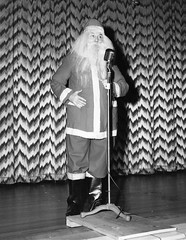
My Dad Santa
Originally uploaded by jimheid.
I posted this photo on Flickr a few days ago; it shows my dad, who, as an actor and broadcaster, would frequently perform as Santa for charity events.
There's a Mac angle to this, too: I've used Bias Inc.'s SoundSoap software to restore some old Christmas recordings he made.
You can read more about my dad Santa—and download an MP3 of one of the restored recordings—by going to the photo's page on Flickr.
Have a safe and happy holiday, everyone!
Posted Wednesday, December 21, 2005
Apple Releases Aperture 1.0.1
Apple has just released an update to its Aperture digital photography application, which I wrote about last week in a Macworld "First Look."
Here's what the company says about version 1.0.1:
Among the key areas addressed are:
- White balance adjustment accuracy and performance
- Image export quality
- Book and print ordering reliability
- Auto-stacking performance
- Custom paper size handling
The updater weighs in at 11.9MB. It's supposedly available for downloading, though at this writing, the link isn't working. I'm grabbing it through Tiger's Software Update utility.
Posted Wednesday, December 14, 2005
Good News, Bad News: My "First Look" at Apple's Aperture
I've written a "first look" at Apple's Aperture program; it's available for your reading pleasure at Macworld's Web site.
Posted Monday, December 12, 2005
A Possible Fix for the 15-inch PowerBook "Audio Echo" Problem
Last month, I wrote that I'm having the "audio echo" problem with my new 15-inch PowerBook. It's a nasty problem that makes Apple's newest 15-inch PowerBook all but unusable for audio applications.
There may be good news to report—yesterday's mail brought this possible fix:
"I bought a new Powerbook 1.67GHz 15" a couple of weeks ago. And I also had problems with the audio echoing and gaining for a couple of seconds. I'm currently writing a IAX Soft phone program for the Mac, so I was convinced that it had to do with my program. But I finally found a solution. Delete the settings file com.apple.audio.DeviceSettings.plist that you find in /Library/
Preferences and reboot. I used the terminal app to delete it, but it should work from [the] Finder as well."
Veddy interesting. I'm attending a conference and haven't had time to test this (I hope to get to it tonight). But I thought I'd pass it along in the meantime.
If it works for you, please let me know!
Posted Thursday, December 01, 2005
EyeTV Software Updated to Support Direct 5G iPod Video Export
The headline says it all.
Here's a little more detail from Elgato Systems' press release: "Elgato Systems today released EyeTV software 1.8.4. This free update offers a convenient, one-step export of recordings to formats that are optimized for viewing on both video-capable iPods and on televisions connected to iPods."
"With EyeTV 1.8.4, EyeTV users can now export their EyeTV recordings to a video-capable iPod using two new preset formats. One preset uses QuickTime H.264 compression, Apple's preferred format. The second preset uses MPEG-4 compression, which encodes up to five times faster than H.264 and has higher resolution output. The MPEG-4 preset is recommended as it provides the best quality for viewing either on an iPod screen or on a TV screen. Neither preset requires QuickTime Pro."
Yay!



